

December 8, 2021, Posted by Absolute Destruction
Last Updated:
Key Takeaways
- Dental offices must protect patient information throughout its full lifecycle, from collection to secure destruction.
- Administrative, physical, and technical safeguards work together to reduce unauthorized access and privacy risks.
- Staff training, controlled access, and secure communication are essential to maintaining patient confidentiality.
- Paper records, electronic data, and retired devices require secure storage, retention, and disposal procedures.
- A clear incident response plan helps dental practices contain privacy breaches and address weaknesses quickly.
Every health professional needs accurate records to do their job well. Dentists are no exception. They have to get to the root of specific problems and administer the right solutions. Therefore, it is essential to get an accurate profile of their patient and their experiences.
However, most of this information is sensitive. So, dental staff needs to be well-versed in handling this information adequately. Learn more about patient data and how dental offices are protecting this information.
Administrative, Physical, and Technical Safeguards
To operationalize privacy protection effectively, a dental practice must look beyond a basic written policy and implement a structured security framework. This approach balances three distinct pillars of defense: administrative, physical, and technical safeguards.
- Administrative Safeguards: Protecting patient data depends heavily on human workflows and clear practice boundaries. Offices must assign a dedicated staff member to oversee compliance, conduct regular privacy risk assessments, and establish role-based access. This ensures team members only access files that match their specific clinical need-to-know. Furthermore, formal protocols must dictate how to verify a patient's identity over the phone before disclosing health information. Staff training is an essential component here; you can review the IPC Small Health Care Organizations Handbook to understand how smaller operations can build robust internal privacy controls. All team members should sign explicit confidentiality agreements during onboarding, with refresher sessions built into regular staff training cycles.
- Physical Safeguards: Digital threats receive significant attention, but physical vulnerabilities remain a major cause of data breaches and identity theft. Protecting information physically requires strict area controls. Dental charts, paper registration forms, and old employee files must be kept in locked and secure file cabinets, located away from public view. Movable storage devices, like backup tapes or legacy internal hard drives, must be stored in restricted-access areas. Additionally, visual privacy matters in a busy office; computer monitors at the reception desk should utilize privacy screens to prevent patients or visitors from accidentally viewing another individual's clinical or financial records.
- Technical Safeguards: Securing electronic records management systems requires a multi-layered digital perimeter. Practices must enforce strict password hygiene across all workstations, combined with multi-factor authentication (MFA) for remote access. All patient health information, whether stored on a local office server or transmitted externally via email or digital portals, must be encrypted. Referencing the technical overview on the IPC Health Organizations Resource Page helps clarify how Ontario's privacy law applies to digital and local network configurations. Automated audit trails should run constantly in the background to log exactly who accessed, edited, or exported a file and when. Finally, critical systems require automatic logouts after brief periods of inactivity to prevent unauthorized access when a team member steps away from a chair or desk.
Data in Dental Offices
Every patient that comes into a dental office has their information protected by law. This is true at both the federal and provincial levels. In Canada, you can invoke either the Privacy Act or the Personal Information Protection and Electronic Documents Act. In Ontario, this takes the form of the Personal Health Information Protection Act (PHIPA).
The law protects all pertinent patient information in a medical institution. This can include:
Personal identifiers (names, addresses, dates of birth, telephone numbers, etc.)
Financial information (insurance, bank account numbers, credit cards, etc.)
Health information (medical and dental conditions, treatment history, medications, etc.)
Dental records (x-rays, charts, etc.)
Consent is essential in every step of the data collection or distribution process. Dentists and their staff would need the patient's consent before recording their information. If they need to share this data with another party, they will also need the patient's authorization. The patient also reserves the right to withdraw their approval at any time.
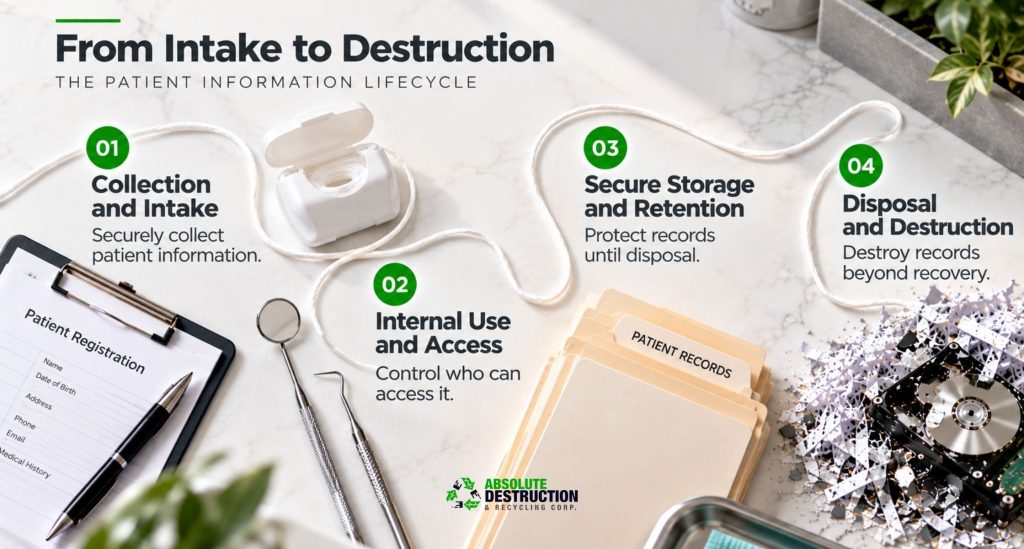
The Patient Information Lifecycle Workflow
Topical authority is established by managing patient information safely throughout its entire lifespan. Data protection is not a single event; it is an ongoing process that begins at initial contact and only ends with secure final disposal.
- Collection and Intake: The lifecycle begins when an individual fills out a registration form, providing contact details, credit card numbers, and detailed medical history. To protect this data at the point of entry, digital intake portals must use secure, encrypted channels. If using paper clipboard forms, staff should collect them immediately rather than letting them sit on the front desk where other patients could read them.
- Internal Use and Access: Once entered into the dental record, the information must be handled with constant care. When specialists discuss treatment recommendations, or when the administrative team processes insurance information for third-party adjudication, conversations must happen discreetly. Dental professionals can reference the RCDSO Medical History Recordkeeping Guide to see how clinical details are systematically gathered and protected under professional regulatory standards. Staff should avoid discussing clinical details or financial balances near the waiting room or open hallways where accidental disclosure can occur.
- Secure Storage and Retention: Whether an office utilizes paperless recordkeeping or maintains physical charts, data must remain organized and secure during its legal retention period. However, keeping records for too long creates unnecessary liability. Outdated employee records, old financial sheets, and inactive dental files increase the amount of sensitive data exposed if a break-in or cyberattack happens. Practices must systematically flag records that have passed their legal retention threshold for immediate removal.
- Disposal and Destruction: The final phase of the lifecycle is often where the greatest vulnerabilities exist. Simply tossing obsolete documents into an office recycling bin or throwing a replaced server into the trash does not constitute safe disposal. Pieces of paper can easily be pulled from recycling containers, exposing patients to fraud and the practice to severe reputational damage. Old computer towers, digital X-ray hard drives, and physical charts must be systematically destroyed so they are completely unrecoverable. Incorporating commercial document destruction workflows ensures that paper materials are shredded using secure industrial methods, while utilizing verified commercial data destruction methods ensures physical electronic storage media is crushed or shredded beyond recovery. For offices clearing out years of archived files, arranging for bulk document shredding minimizes the risk of accidental exposure during large-scale clear-outs.
Privacy Protection Practices in the Dental Office
It is imperative for dental offices to take proactive steps to protect patient data. Not only does it help follow the law, but it also maintains good patient relationships. Here are some ways to protect your patients' confidential data.
Administrative
The administrative level involves creating systems and policies to protect your data. This aspect is essential as data protection needs to be a priority. A lack of a working data management system can leave your records vulnerable. Here are some practices that could strengthen your administrative safeguards:
- Establishing policies and procedures for data collection, distribution, and management.
- Drafting contracts and forms with data protection and consent in mind.
- Creating emergency procedures for data breaches.
- Regular policy reviews with staff and management.
Physical
Information records often take physical forms. Even electronic data resides in physical equipment and spaces. Thus, comprehensive data protection policies will need to include physical means.
- Using physical or electronic locks for doors, windows, buildings, and storage facilities.
- Locking up filing cabinets for paper documents.
Availing of commercial destruction services that cover documents and specialty items. These include shredding of documents that hold personal and insurance information as well as the destruction of such items as dental moulds and X-rays.
Protecting files and equipment from the elements (fires, floods, UV damage).
Technical
Many institutions have transitioned to electronic means of data collection and storage. After all, it can be very convenient for all parties involved. However, this method of data storage isn't immune to attacks. Here's how you can keep your electronic files safe.
- Install security software and keep them up-to-date.
- Monitor who has access to your data and make use of multi-factor authentication.
- Encrypt any confidential files.
In case of a data breach, notify your patients immediately. You should also report the incident to your province's privacy commissioner.
Common Privacy Risks in Dental Practices
Even practices with strong intentions can suffer costly data breaches due to everyday operational oversights. Recognizing these common failure points allows offices to proactively mitigate risks before they compromise patient confidentiality.
- Improper Communication Channels: Sending diagnostic images, progress notes, or financial ledgers via standard, unencrypted text messages or standard email lines creates a direct interception risk.
- Credential Sharing: Staff members sharing passwords or logging in under a colleague's account to save time disrupts audit trails, making it impossible to accurately track internal data access.
- Unattended Sensitive Files: Leaving physical charts open on a counter, printing out financial records and leaving them sitting in an active printer tray, or leaving a workstation active and unattended invites unauthorized viewing.
- Insecure Vendor Controls: Partnering with third-party software vendors, IT providers, or maintenance teams without screening their security protocols or establishing clear data handling agreements leaves the practice highly vulnerable to supply-chain cyber threats. For specific requirements on partner vetting, dentists should consult the official guidelines found on the RCDSO Dental Recordkeeping Course Hub, which outlines professional expectations for clinical documentation security.
- Improper Physical Disposal: Tossing un-shredded appointment schedules, lab slips, or payment receipts directly into trash cans or standard recycling bins provides an easy target for identity theft. This risk extends to non-paper medical waste, meaning practices should integrate certified commercial specialty destruction protocols to properly dispose of older analog X-rays or custom dental moulds that contain patient identifiers.
A Practical Compliance Checklist for Dental Offices
Use this quick-reference checklist to evaluate your practice's current security posture and identify areas that require immediate attention:
- Do we have a comprehensive, written workplace privacy policy that is reviewed and updated annually?
- Are all new employees put through dedicated confidentiality training, and do they sign formal data agreements during onboarding?
- Is internal access to patient charts restricted based on role, ensuring a "minimum necessary" access workflow?
- Are physical documents stored securely in restricted areas within a locked and secure file cabinet?
- Are all digital records hosted on encrypted file servers with active, multi-factor authentication enforced?
- Do we regularly test our digital data backup and system restoration procedures to handle potential system failures?
- Have we verified that our website's privacy policy accurately details our use of analytics, cookies, or remarketing tools?
- Do we have a formalized, step-by-step incident response plan ready to deploy if a data breach occurs?
- Are we treating information destruction as an ongoing business process rather than a sporadic, one-time task?
- Do we bypass standard recycling bins and contact an information destruction provider to safely shred physical records and crush decommissioned electronic hardware?
How to Handle Information When Outside the Dental Office
Conversations
Avoid talking about patient details in public places or through the phone.
Paper Documents
Maintain a tracking system or logbook when taking documents outside the office. Keep confidential documents out of sight.
Electronic Devices
Stay away from using public networks when sending confidential files. Password-protect your work electronics and storage devices.
Prioritize your dental patients' confidentiality by seeking the services of Absolute Destruction to properly dispose of their information.
“Ensure that your office computers and other IT equipment are handled and maintained only by certified IT professionals to avoid possible data breaches.” - Absolute Destruction
Incident Response and Preparedness
Real data protection includes being fully prepared for moments when preventative controls fail. If a privacy incident occurs, whether it is a lost physical file, an accidental email disclosure, or a sophisticated ransomware attack, the practice must respond immediately through a structured containment plan.
- Immediate Containment: The moment an issue is discovered, the practice must take instant steps to stop the breach. This might involve disconnecting an infected server from the network, revoking compromised user credentials, or physically recovering a misplaced document.
- Risk Assessment: The practice must quickly investigate the scope of the incident. This involves determining exactly what personal health information was exposed, identifying how many individuals are affected, and evaluating the potential severity of identity theft, fraud, or reputational harm.
- Mandatory Notification: Depending on local regulatory requirements and privacy laws, practices are often legally required to notify the affected individuals and the appropriate privacy commissioner. To understand reporting thresholds, offices can view the IPC Ontario Health Privacy Overview, which explains the official definitions and regulations regarding reporting a breach in the province. Notifications must be clear, transparent, and outline the exact steps the office is taking to mitigate further harm.
- Post-Incident Review: Once the immediate threat is resolved, the management team must document the entire event thoroughly. The practice should audit its existing workflows, patch technical gaps, and update internal privacy policies to prevent a similar vulnerability from being exploited in the future.
Absolute Destruction and Dental Patient Confidentiality
Proper data destruction should be part of every dental clinic's information management. Not only does it protect your patients, but it also maintains the integrity of your practice. Absolute Destruction knows the importance of privacy protection in the dental office. Our years of experience have helped many businesses maintain optimal privacy practices. Contact us today for a consultation.
FAQs on How Dental Offices Can Protect Patient Information
Are Canadian patients protected by PIPEDA regulations when they visit a dental clinic?
Yes, private-sector dental practices across Canada must comply with the federal Personal Information Protection and Electronic Documents Act (PIPEDA). This law governs how businesses collect, use, and disclose a client's personal information. However, provinces like Ontario have established localized privacy laws, such as the Personal Health Information Protection Act (PHIPA), that take precedence. Regardless of jurisdiction, your dental regulatory authority mandates that safeguarding a patient's dental record is a binding legal and ethical obligation.
What are the critical signs that a dental practice requires a comprehensive privacy audit?
An office requires an immediate data security audit if it experiences recent data breaches, unmanaged software vulnerabilities, or persistent patient privacy complaints. Operating without role-based access controls on your electronic records management systems or failing to establish a clear privacy policy are also major warning signs. If your administrative staff routinely throws physical files into standard recycling bins without a secure destruction protocol, your practice faces severe corporate liabilities and requires an immediate operational overhaul.
Is it legally permissible to install surveillance cameras inside a Canadian dental office?
Installing surveillance cameras is generally permissible in public areas, such as waiting rooms and reception areas, to enhance physical security. However, practices must display clear signage to ensure transparent patient consent. Cameras are strictly prohibited in private spaces like washrooms and are heavily restricted in clinical examination rooms where sensitive personal health information is discussed. Unregulated recording can result in severe privacy violations, violating guidelines outlined by the Royal College of Dental Surgeons of Ontario (RCDSO).
What specific personal health information must a dental office protect under Canadian privacy laws?
Under provincial health frameworks, Ontario dental practices must safeguard a patient's complete file throughout its entire operational lifecycle. This includes basic contact information, credit card numbers, insurance information, and detailed medical and dental history. Whether managing legacy paper charts or modern digital files, protecting this sensitive data from unauthorized access is a strict compliance requirement designed to mitigate identity theft, fraud, and severe reputational damage across the medical community.
Can a dental office share a patient's medical and dental history with external parties?
Yes, but data transmission must align with strict legal and regulatory requirements and explicit patient consent. Practices routinely share data for core internal management purposes, such as third-party adjudication for insurance claims or direct communication with other healthcare providers to coordinate care. To protect personal health information, offices must ensure that external software vendors or third-party providers sign strict confidentiality agreements and utilize encrypted channels to safeguard all transferred files.
How should a dental office securely store paper records and digital assets?
Physical files like historic charts, financial sheets, and employee records must be locked within access-controlled locations using a locked and secure file cabinet. For digital assets, data must be hosted on password-protected networks with automatic backup routines. Additionally, offices must establish clear digital audit trails and implement role-based access controls, ensuring that team members can only view clinical files or diagnosis and testing results that match their specific clinical need to know.
What hidden digital privacy risks exist on a dental practice's public website or portal?
Modern paperless recordkeeping introduces unique web-based liabilities. If a dental practice utilizes online booking systems or tracks user metrics via Google Analytics for online digital remarketing, they must deploy tracking filters to prevent leaking health details. Practices should appoint a dedicated privacy officer, mandate periodic independent cybersecurity audits, and display a clear online privacy policy detailing how data is processed, ensuring all digital tools remain fully compliant with regional regulatory expectations.
Why is throwing away or recycling expired dental records considered a compliance risk?
Tossing paper charts, registration clipboards, or scheduling logs directly into standard recycling bins provides an easy target for fraud, corporate espionage, and identity theft. Standard recycling streams are not secure. Once a file surpasses its mandatory legal retention period, retaining records too long creates unnecessary liability. Material must be shredded beyond recognition using industrial methods, treating secure disposal as a continuous compliance workflow by integrating certified commercial document destruction routines.
What steps should a dental office take immediately following a data breach?
If a security baseline fails, the office must instantly activate its incident response plan. The practice must achieve immediate containment by shutting down affected networks or isolating physical files. Next, they must perform an immediate risk assessment to identify what data, treatment plans, and progress notes were exposed. Finally, the office must notify affected individuals and the appropriate privacy commissioner according to the Information and Privacy Commissioner of Ontario (IPC) guidelines.